
Offers row
The first card row under the results — the one headed with your best offers right now.
A Content rail in the Page entry's Sections list
What makes it this section
This is what places the rail in the offers row rather than the trips row. Both spellings land in the same row.
What a visitor sees
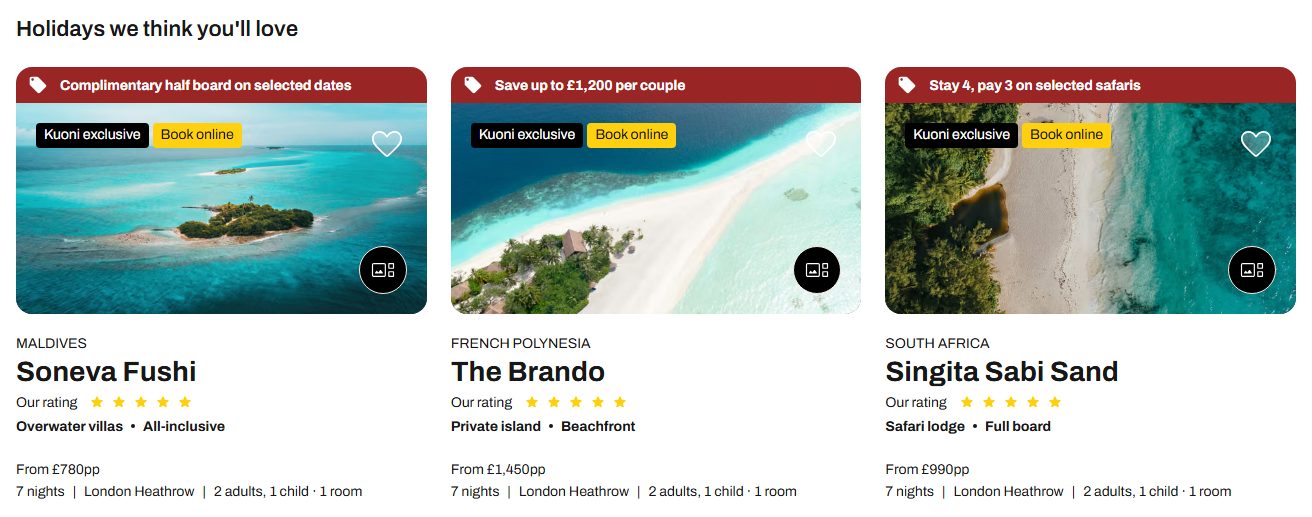
- 1
Heading — from the rail
- 2
The cards — from the search
What each field controls
The Field column is the label as it appears in Contentful; under it, the field's id, for talking to a developer. The number matches the marker on the screenshots above.
| # | Field | What it controls | Notes |
|---|---|---|---|
1 | Heading heading | The row's title. | This is the ONE thing the rail supplies on this page. The cards themselves come from the search, not from the rail's own card list. |
Card source sourcerequired | Which of the two rows this rail is the heading for. | Set it to offers or hotels for this row. A rail whose source is something else, and whose cards are neither hotel nor trip cards, cannot be placed — its heading then appears nowhere on the site, and the page records that as a fault rather than failing quietly. | |
Heading level / Heading style / Heading colour headingLevel / headingVariant / headingColor | The row title's importance for search engines, its size, and its colour. | All three are honoured on this page. Leave them empty to keep the size the design sets. | |
2 | The cards — | Nothing you can set here. | They come from the search. Filling in this rail's Cards list changes nothing on this page. |
How to change it, step by step
Open the search results Page entry
The Page entry whose Kind is "searchResults". Scroll to its Sections list.
Add or open a Content rail there
Add content → Content rail, or open the one already linked. Sections on this page carry nothing except these two row headings, so do not expect a rail here to render as a full section.
Set Card source, then the heading
Card source decides which row the heading lands in — offers or hotels for this row. Then type the heading.
Publish the rail and the Page entry
Publish the rail, then publish the Page entry if you added the rail to its Sections list.