
Filters
The 'Search filters' drawer: every group, its wording, its options, and which tabs it applies to.
Search results (Page)
What makes it this section
A JSON object on the Page entry, holding every group in the drawer.
What a visitor sees
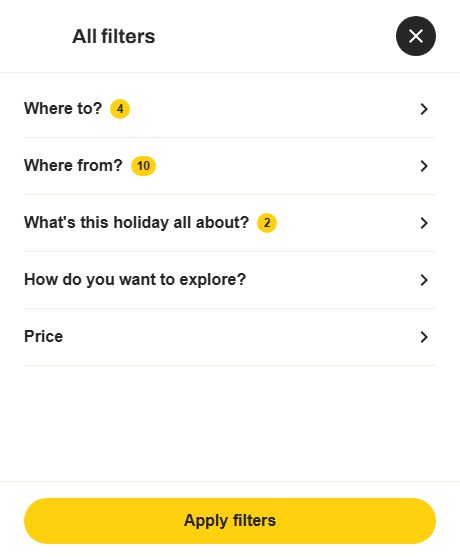
- 1
A group's label
- 2
A price group, not a checklist
- 3
How many of its options are ticked
- 4
Apply — not authored
What each field controls
The Field column is the label as it appears in Contentful; under it, the field's id, for talking to a developer. The number matches the marker on the screenshots above.
| # | Field | What it controls | Notes |
|---|---|---|---|
Filters filters | The filter groups, their wording and their options. | A JSON object: { "groups": [ … ], "byTab": { … } }. A bare [ … ] of groups is also accepted. Every group is either a checklist or a price slider. | |
— groups[].id filters.groups[].idrequired | The group's identity, used by byTab below. | Free text, but keep to the ids the page already uses so the per-tab lists keep working: where-to, where-from, about, explore, board-basis, star-rating, price, show-only. | |
1 | — groups[].label filters.groups[].labelrequired | The group's heading in the drawer. | — |
2 | — groups[].type filters.groups[].typerequired | Whether the group is a list of tickboxes or a price slider. | The two shapes take different keys. A checklist needs options; a price group needs min, max, defaultMin, defaultMax and a three-letter currencyCode, and may take a step. Choose one of: checklist price |
3 | — groups[].options[] filters.groups[].options[] | The tickboxes in a checklist group. | Each one is { "id", "label", "defaultChecked" }. A checklist group with an empty options list is invalid. |
— groups[].note / footerLink filters.groups[].note | A line of explanation under the group, and an optional link under that. | footerLink is { "label", "href" } — e.g. "Search again". | |
— byTab filters.byTab | Which groups apply on which tab. | One list of group ids per tab, e.g. { "hotels": ["board-basis","star-rating","price"], "destinations": [] }. An empty list means that tab has no filters, which is what Destinations needs — its cards are minimal and there is nothing to filter on. The drawer in the screenshot shows five groups because that is what the open tab is entitled to. | |
4 | The drawer's own furniture — | Nothing you can set. | The title "All filters", the Apply button and the close cross are built in. |
How to change it, step by step
Open the search results Page entry
Search Contentful for the Page entry whose Kind is "searchResults" and open it.
Open the Filters object editor
This field is a JSON object, not a set of boxes. Contentful shows it as a code editor and checks nothing about what you type, so the shape below has to be exactly right.
Edit the JSON, keeping the shape
Change labels and order freely. Do not invent ids: an id the page has no code for is dropped, and the page records that it dropped it.
Publish, then check the page
Change status → Publish. If the field is malformed the page ignores it WHOLESALE and keeps its built-in copy rather than applying half of it — so a page that looks unchanged after publishing usually means a JSON error. /api/debug-fallbacks lists what fell back and why.